TFT Displays for Patient Monitoring Equipment
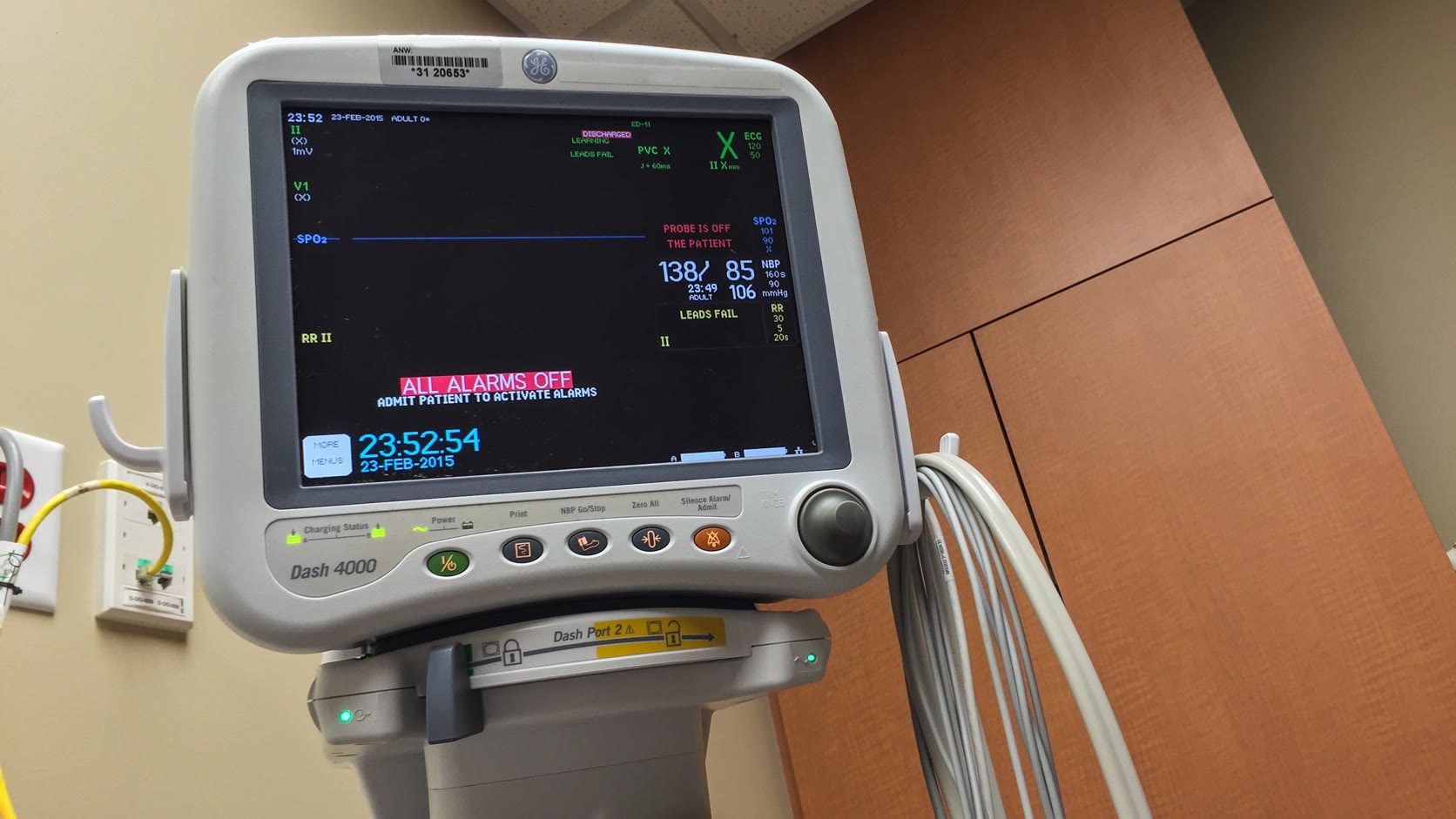
A patient monitor display is a clinical decision interface. It presents waveforms, numeric values, alarm priority, sensor quality, battery state, and device status—often to several people viewing from different positions. The screen therefore has to be legible, predictable, cleanable, and tightly integrated with the monitor’s risk management and usability engineering.
The display should not be selected as a standalone visual component. LCD, touch, graphics software, alarm logic, physical controls, enclosure, power system, and electromagnetic compatibility all affect what the user sees and how safely the device can be operated.
This article discusses engineering considerations, not regulatory approval or clinical performance. Requirements must be derived from the intended use, users, environments, risk analysis, and applicable standards for the specific device and market.
Start with the viewing task
A bedside monitor may be read from arm’s length during setup and from several meters away during routine observation. A transport monitor is viewed close-up while moving. A central station shows several patients at once. These are not interchangeable display use cases.
| Use condition | Display need | Verification approach |
|---|---|---|
| Bedside setup | Clear touch targets, lead status, parameter limits | Simulated setup with representative users |
| Across-room observation | Large critical values and visible alarm state | Test at defined distance and angle |
| Patient transport | Stable image under motion and changing light | Evaluate in corridor, lift, vehicle, and battery use |
| Procedure area | Wide viewing angle and glare control | Test under procedure lighting and multiple observers |
| Cleaning and turnover | Sealed, chemically compatible front | Repeated cleaning-cycle study |
| Power interruption | Immediate status and predictable recovery | AC removal, battery transition, depleted battery tests |
FDA human factors guidance emphasizes intended users, uses, and use environments, with the goal of reducing use-related risk. The agency’s human factors overview specifically includes displays, controls, visual and audible alarms, maintenance, and the full user interface.
Information hierarchy before pixel count
Patient monitors often display ECG, SpO2, respiration, blood pressure, temperature, and derived values. More resolution can support sharper waveforms and more parameters, but it can also encourage dense layouts. The critical question is what remains visible when the screen is full, an alarm is active, and one sensor has poor signal quality.
Primary values need consistent locations and sufficient size. Units should remain visible. Alarm limits should be distinguishable from the measured value. A disconnected lead, artifact, or invalid measurement must not look like a normal zero.
Color is useful but should not carry meaning alone. Pair alarm color with text, position, shape, and audible behavior as required by the device’s alarm design. Preserve the highest-priority condition while still allowing the user to understand secondary technical alarms.
IEC 62366-1 specifies a usability engineering process related to medical-device safety. The IEC 62366-1 overview is a useful reference when connecting display requirements to use scenarios, use errors, risk controls, and evaluation.
Brightness, black level, and viewing angle
Clinical rooms range from bright emergency departments to dark recovery areas. The display needs a wide and controllable luminance range. Maximum brightness is only half of the requirement; minimum brightness and black level matter for low-light viewing.
An IPS-type TFT is often preferred because several clinicians may view the screen from different angles. Validate actual contrast, color, and alarm readability through the final cover lens. Touch sensors, air gaps, coatings, and protective glass add reflection.
Automatic brightness can help, but an incorrect response can be distracting or unsafe. Avoid rapid brightness pumping when a person passes the ambient sensor. Provide a predictable manual control where appropriate and ensure critical indications remain visible throughout the range.
If the device is portable, consider the display in daylight during ambulance loading or movement between buildings. The optical questions overlap with high-brightness industrial displays, but medical usability requirements should determine the final limits.
Waveforms and graphics performance
Waveform quality depends on more than panel resolution. Sampling, scaling, anti-aliasing, update timing, frame buffering, and pixel response all affect the displayed trace. A high-resolution LCD cannot correct a poor rendering pipeline.
Test representative heart rates and signal conditions, including artifact, lead failure, and transitions between states. Watch for tearing, dropped frames, stair-stepping, delayed numerics, or a trace that appears smooth while the numeric value is stale. If the graphics system uses several layers, verify that alarm banners cannot be covered by a dialog or transient software fault.
The boot sequence also matters. Define when the backlight comes on, what appears before monitoring data is valid, and how the device shows self-test or connection progress. A blank screen during a long initialization period can look like a failed monitor.
Touch, physical controls, and cleaning
PCAP touch allows a sealed front and flexible UI, but it should be evaluated with gloves, disinfectant residue, moisture, and the final cover glass. Touch targets must account for hurried operation and limited fine motor control. Critical settings need clear confirmation and feedback.
Physical controls still have value. Power, alarm silence, and a rotary selector may be easier to find without navigating a menu. Their exact use depends on the device design and risk analysis. The important point is consistency: an alarm-related hardware control should have an unmistakable state and corresponding on-screen feedback.
Cleaning is a material-compatibility program, not a one-time wipe. Specify approved agents, concentrations, contact time, frequency, and technique. Inspect glass coatings, printed legends, adhesives, gaskets, and touch performance after repeated cycles. The same front-surface lessons used for laboratory equipment displays apply, but the medical cleaning protocol and risk controls govern the test.
EMC, power, and essential display behavior
Patient monitors operate near radios, phones, electrosurgical equipment, pumps, beds, chargers, and network devices. EMC design and testing must cover the complete product. Display symptoms may include noise, false touch, frozen frames, resets, or loss of communication with an internal board.
Cable routing and grounding should be fixed before formal testing. A temporary long display cable used during development can behave differently from the production harness. Re-test after mechanical or supplier changes that affect the display stack or controller.
For portable equipment, transition between mains and battery should not create a display reset or ambiguous monitoring state. Battery warnings must be visible early enough for the intended response. Define display behavior at low battery, during charging, and after unexpected shutdown.
The FDA notes that use environments may have high or low lighting, noise, clutter, distractions, and movement that makes displays harder to read. Its current human factors considerations page is a practical reminder to test beyond a quiet engineering bench.
Validation should use realistic scenarios
Component checks do not replace user-interface and system validation.
| Scenario | Display-related questions |
|---|---|
| Sensor disconnect during monitoring | Is invalid data clearly different from a valid low value? |
| Multiple simultaneous alarms | Is priority clear without hiding the originating condition? |
| Dark-room operation | Are values readable without excessive light or lost color distinction? |
| Bright-light transport | Do glare and reflections obscure critical information? |
| Cleaning immediately before use | Does residue affect touch or optical clarity? |
| AC-to-battery transition | Is monitoring continuous and battery state obvious? |
| Network or module communication loss | Are stale data and communication faults explicit? |
| Restart after interruption | Does the device return to a safe, understandable state? |
Use representative clinicians or intended users where required by the usability plan. Capture task success, close calls, confusion, and recovery—not only whether a screen technically rendered. The broader industrial TFT validation checklist can help organize optical and environmental testing, but it must be supplemented by the medical device’s formal risk, usability, electrical safety, EMC, software, and clinical requirements.
Questions engineers ask early
Is IPS the best TFT technology for a patient monitor?
IPS is often a strong choice because contrast and color remain more stable for several observers and off-axis viewing. It still needs evaluation through the final touch sensor and cover lens under the intended lighting.
What matters more: maximum brightness or dimming range?
Both matter, but clinical use often makes a wide, predictable dimming range more useful than a very high maximum alone. The display must remain legible in bright transport conditions without becoming uncomfortable in a dark room.
Bottom line
The right patient-monitor TFT is the one that supports a validated clinical interface across the intended viewing distances, lighting, cleaning, power, and alarm conditions. Choose the panel and touch system with the complete device architecture in mind. Then verify that users can distinguish valid data, invalid data, alarms, and device state quickly—even when the environment is busy.
Engineering references and image credit
- FDA: Applying Human Factors and Usability Engineering to Medical Devices
- FDA: Human Factors and Medical Devices
- IEC 62366-1: Application of usability engineering to medical devices
Hero photograph: Tony Webster / Wikimedia Commons, licensed under CC BY 2.0. Cropped and resized for this page. The photograph is illustrative; no manufacturer, hospital, or photographer endorsement is implied.
.jpg)