Wide Temperature TFT Displays for Heavy Equipment and Outdoor Machinery
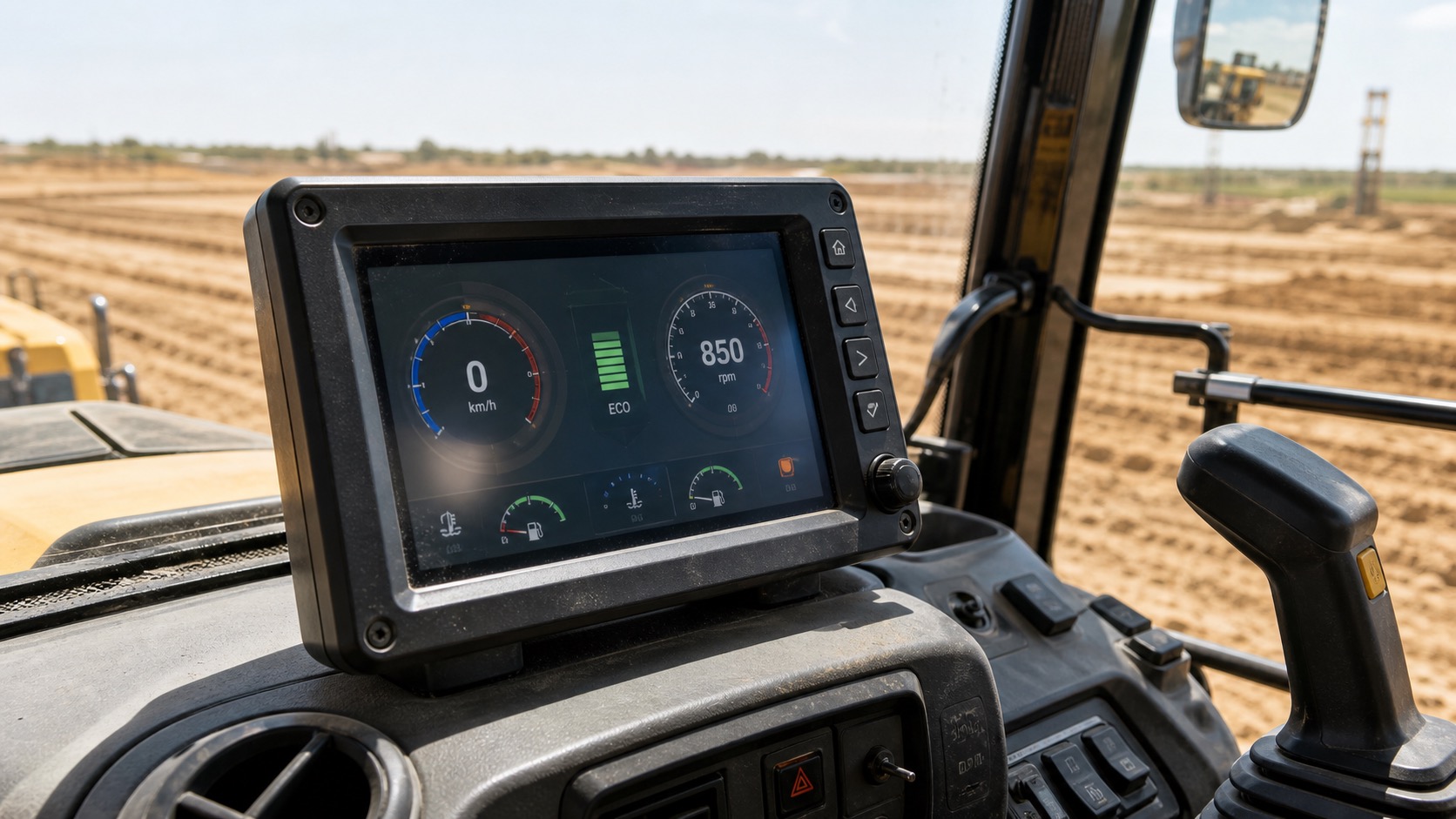
Heavy equipment displays live a harder life than most embedded screens. They sit in cabins that heat up under the sun, start in cold mornings, vibrate for hours, collect dust, and may be washed down or wiped with whatever is available on site. A TFT module that works well in a clean indoor panel may not survive long in a loader, crane, excavator, or utility vehicle. Tractors add implement-network and field-operation concerns covered in the dedicated agricultural machinery display guide.
The display in heavy equipment is usually more than a convenience feature. It can show speed, hydraulic status, engine data, camera feeds, warnings, maintenance prompts, and attachment settings. When the display is hard to read or slow to respond, the operator loses confidence in the machine.
For outdoor machinery and vehicle-mounted dashboards, the display choice needs to be made around heat, cold starts, vibration, sunlight, gloves, and service access rather than temperature range alone.
Temperature range is only the starting point
Wide temperature TFT displays are often specified for operation from -30°C to +80°C or -30°C to +85°C. Some applications require even wider storage ratings. These numbers matter, but they do not tell the whole story.
In a closed cabin, the display surface can become much hotter than ambient temperature when sunlight passes through the glass. In winter, the display may need to start after a cold soak. The LCD material, polarizer, backlight, adhesive, touch panel, and electronics all respond differently to temperature.
At low temperature, response time can slow down. At high temperature, contrast can fall, backlight life can shorten, and some materials may age faster. The display should be tested in the final mounting position or in a realistic thermal setup.
Rapid temperature changes also need a separate TFT condensation prevention review. Compare the coldest internal surface with the local dew point; an enclosure that blocks rain can still trap enough moisture to fog.
Sunlight readability inside a cabin
A machine cabin may seem protected, but it can be optically difficult. Sunlight enters through large windows and reflects from glass, dust, operator clothing, and dashboard surfaces. The display may be viewed from an angle while the operator is moving.
High brightness helps, but contrast and surface treatment are just as important. An IPS TFT panel can improve viewing angle, which is useful when the display is mounted off-center. Anti-glare cover glass can reduce harsh reflections. Optical bonding can improve contrast and make the module more rugged, especially for transportation dashboards that move between sun, shade, and vibration.
The UI should be designed for glance reading. Operators should not have to study the screen for small values while driving or controlling equipment. Large numbers, clear warning colors, and simple layouts work better than dense dashboard graphics.
Vibration and mechanical mounting
Construction and agricultural machinery create constant vibration and occasional shock. The TFT module, FPC, connector, PCB, and mounting frame need to be secured accordingly. A display failure in the field may come from a connector working loose rather than from the LCD itself.
Mounting pressure should be even. Twisting the frame can create display stress, light leakage, touch problems, or cosmetic defects. If the display is installed behind a cover lens, the air gap or bonding layer should be reviewed for vibration and temperature cycling.
Cable routing is also important. Long display cables near motors, alternators, pumps, and switching power electronics can create noise issues. LVDS or other differential interfaces may be preferred for longer cable paths, but the final choice depends on the controller and system layout.
Dust, cleaning, and front surface durability
Heavy equipment displays are touched with dirty fingers, gloves, and sometimes tools. The front surface should be easy to clean and resistant to scratches, oils, and common cleaning chemicals. A sealed front glass design is usually better than an exposed LCD surface.
For touch displays, projected capacitive touch can work well if tuned for gloves and the selected cover glass. Resistive touch may still be considered when heavy gloves, stylus input, or simple single-point operation is required. The right answer depends on how the operator actually uses the machine.
The enclosure should prevent dust from collecting around the screen edge. Deep bezels may protect the display but can trap dirt. Flush or near-flush designs are easier to wipe, provided the impact and sealing requirements are handled.
Backlight lifetime and dimming
Heavy equipment may run long shifts. Backlight life matters, especially for rental fleets, agriculture seasons, and construction projects where downtime is expensive. A high brightness display should not run at maximum brightness all the time unless the thermal design supports it.
Ambient light dimming is useful in vehicles. The display can brighten in daylight and dim at night, improving readability and reducing operator fatigue. Night operation also needs a darker UI theme or at least brightness levels low enough to avoid glare inside the cabin.
Specification checklist
| Requirement | What to check |
|---|---|
| Operating temperature | Confirm LCD, touch, backlight, and electronics ratings |
| Sunlight readability | Test brightness, contrast, viewing angle, and reflections |
| Vibration | Review mounting, connector retention, and cable routing |
| Touch operation | Test gloves, dust, water, and operator posture |
| Interface | Match cable length, EMC needs, and controller platform |
| Lifecycle | Confirm long-term availability and change control |
Testing with real operators
Engineering tests are necessary, but operator feedback catches issues that lab measurements miss. A display may pass brightness tests but still be annoying because warnings are too small, touch targets are poorly placed, or night brightness is too high.
If possible, test the display in a real cabin with the intended mounting angle. Try bright sun, shade, night mode, gloves, engine vibration, and quick glance reading. Small changes before production can prevent years of complaints.
It is also worth checking service behavior. If a display must be replaced in the field, technicians need access to connectors, mounting screws, and calibration settings. A rugged display design should not make routine maintenance unnecessarily slow, especially for fleets that operate during short seasonal windows.
For fleet programs, consistency between production batches is also important. Operators notice when replacement machines have a different viewing angle, dimmer backlight, or changed touch response. Long-term supply control helps keep the user experience predictable.
FAQ
What temperature range should heavy equipment displays support?
Many projects target -30°C to +80°C or +85°C operation, but the final requirement depends on region, cabin design, sunlight exposure, and storage conditions.
Is IPS better for machinery dashboards?
IPS is often helpful because it provides wider viewing angles and stable color. This matters when the operator views the display from an angle or the screen is mounted off-center.
Do heavy equipment displays need optical bonding?
Optical bonding can improve sunlight readability, reduce internal reflections, and strengthen the display stack. It is especially useful for high-value equipment and exposed dashboards.
What causes field failures besides the LCD panel?
Connectors, cable routing, mounting stress, thermal buildup, and touch tuning can all cause problems. The display should be validated as part of the complete system, not only as a standalone module.